
diff options
| author | KiritoDv <kiritodev01@gmail.com> | 2025-02-08 10:46:29 -0600 |
|---|---|---|
| committer | KiritoDv <kiritodev01@gmail.com> | 2025-02-08 10:46:29 -0600 |
| commit | f5158c8d4c3548dbf937a87852b990e0c0adcc61 (patch) | |
| tree | e641344723a5165a75fc3b0a96473816946c52c3 /docs | |
| parent | 922b69e504aa3c9a5bc6963f732b79b87da18a87 (diff) | |
Updating README.md
Diffstat (limited to 'docs')
| -rw-r--r-- | docs/BUILDING.md | 221 | ||||
| -rw-r--r-- | docs/PORT-BUILDING.md | 92 | ||||
| -rw-r--r-- | docs/poweredbylus.darkmode.png | bin | 0 -> 213165 bytes | |||
| -rw-r--r-- | docs/poweredbylus.lightmode.png | bin | 0 -> 210989 bytes |


4 files changed, 221 insertions, 92 deletions
diff --git a/docs/BUILDING.md b/docs/BUILDING.md new file mode 100644 index 000000000..f1033b9fe --- /dev/null +++ b/docs/BUILDING.md @@ -0,0 +1,221 @@ +# Building Starship + +## Windows + +Requires: + * At least 8GB of RAM (machines with 4GB have seen complier failures) + * Visual Studio 2022 Community Edition with the C++ feature set + * One of the Windows SDKs that comes with Visual Studio, for example the current Windows 10 version 10.0.19041.0 + * The `MSVC v143 - VS 2022 C++ build tools` component of Visual Studio + * Python 3 (can be installed manually or as part of Visual Studio) + * Git (can be installed manually or as part of Visual Studio) + * Cmake (can be installed via chocolatey or manually) + +During installation, check the "Desktop development with C++" feature set: + +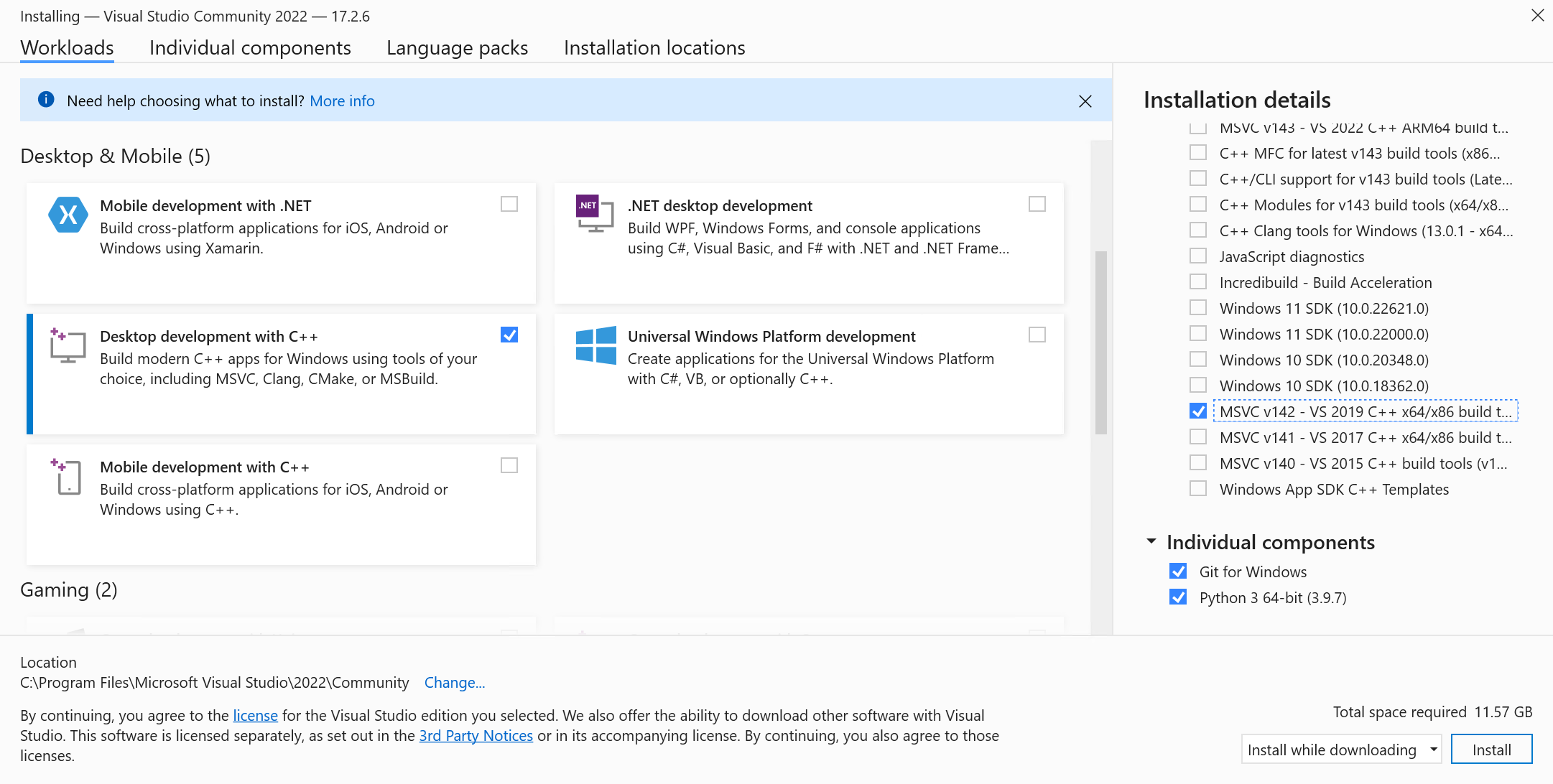 +Doing so should also check one of the Windows SDKs by default. Then, in the installation details in the right-hand column, make sure you also check the v143 toolset. This is often done by default. + +It is recommended that you install Python and Git standalone, the install process in VS Installer has given some issues in the past. + +1. Clone the Starship repository + +_Note: Be sure to either clone with the ``--recursive`` flag or do ``git submodule update --init`` after cloning to pull in the libultraship submodule!_ + +2. After setup and initial build, use the built-in OTR extraction to make your sf64.o2r file. + +_Note: Instructions assume using powershell_ +```powershell +# Navigate to the spaghetti repo within powershell. ie: cd "C:\yourpath\spaghetti" +cd spaghetti + +# Setup cmake project +# Add `-DCMAKE_BUILD_TYPE:STRING=Release` if you're packaging +& 'C:\Program Files\CMake\bin\cmake' -S . -B "build/x64" -G "Visual Studio 17 2022" -T v143 -A x64 + +# Generate sf64.o2r +& 'C:\Program Files\CMake\bin\cmake.exe' --build .\build\x64 --target ExtractAssets + +# Compile project +# Add `--config Release` if you're packaging +& 'C:\Program Files\CMake\bin\cmake.exe' --build .\build\x64 + +# Now you can run the executable in .\build\x64 or run in Visual Studio +``` + +### Developing Starship +With the cmake build system you have two options for working on the project: + +#### Visual Studio +To develop using Visual Studio you only need to use cmake to generate the solution file: +```powershell +# Generates spaghetti.sln at `build/x64` for Visual Studio 2022 +& 'C:\Program Files\CMake\bin\cmake' -S . -B "build/x64" -G "Visual Studio 17 2022" -T v143 -A x64 +``` + +#### Visual Studio Code or another editor +To develop using Visual Studio Code or another editor you only need to open the repository in it. +To build you'll need to follow the instructions from the building section. + +_Note: If you're using Visual Studio Code, the [cpack plugin](https://marketplace.visualstudio.com/items?itemName=ms-vscode.cmake-tools) makes it very easy to just press run and debug._ + +_Experimental: You can also use another build system entirely rather than MSVC like [Ninja](https://ninja-build.org/) for possibly better performance._ + + +### Generating the distributable +After compiling the project you can generate the distributable by running: +```powershell +# Go to build folder +cd "build/x64" +# Generate +& 'C:\Program Files\CMake\bin\cpack.exe' -G ZIP +``` + +### Additional CMake Targets +#### Clean +```powershell +# If you need to clean the project you can run +C:\Program Files\CMake\bin\cmake.exe --build build-cmake --target clean +``` + +## Linux +### Install dependencies +#### Debian/Ubuntu +```sh +# using gcc +apt-get install gcc g++ git cmake ninja-build lsb-release libsdl2-dev libpng-dev libsdl2-net-dev libzip-dev zipcmp zipmerge ziptool nlohmann-json3-dev libtinyxml2-dev libspdlog-dev libboost-dev libopengl-dev libogg-dev ibvorbis-dev + +# or using clang +apt-get install clang git cmake ninja-build lsb-release libsdl2-dev libpng-dev libsdl2-net-dev libzip-dev zipcmp zipmerge ziptool nlohmann-json3-dev libtinyxml2-dev libspdlog-dev libboost-dev libopengl-dev libogg-dev libvorbis-dev +``` +#### Arch +```sh +# using gcc +pacman -S gcc git cmake ninja lsb-release sdl2 libpng libzip nlohmann-json tinyxml2 spdlog sdl2_net boost libogg libvorbis + +# or using clang +pacman -S clang git cmake ninja lsb-release sdl2 libpng libzip nlohmann-json tinyxml2 spdlog sdl2_net boost libogg libvorbis +``` +#### Fedora +```sh +# using gcc +dnf install gcc gcc-c++ git cmake ninja-build lsb_release SDL2-devel libpng-devel libzip-devel libzip-tools nlohmann-json-devel tinyxml2-devel spdlog-devel boost-devel libogg-devel libvorbis-devel + +# or using clang +dnf install clang git cmake ninja-build lsb_release SDL2-devel libpng-devel libzip-devel libzip-tools nlohmann-json-devel tinyxml2-devel spdlog-devel boost-devel libogg-devel libvorbis-devel +``` +#### openSUSE +```sh +# using gcc +zypper in gcc gcc-c++ git cmake ninja SDL2-devel libpng16-devel libzip-devel libzip-tools nlohmann_json-devel tinyxml2-devel spdlog-devel libogg-devel libvorbis-devel + +# or using clang +zypper in clang libstdc++-devel git cmake ninja SDL2-devel libpng16-devel libzip-devel libzip-tools nlohmann_json-devel tinyxml2-devel spdlog-devel libogg-devel libvorbis-devel +``` + +### Build + +_Note: If you're using Visual Studio Code, the [CMake Tools plugin](https://marketplace.visualstudio.com/items?itemName=ms-vscode.cmake-tools) makes it very easy to just press run and debug._ + +```bash +# Clone the repo and enter the directory +git clone https://github.com/HarbourMasters/SpaghettiKart.git +cd SpaghettiKart + +# Clone the submodules +git submodule update --init + +# Generate Ninja project +# Add `-DCMAKE_BUILD_TYPE:STRING=Release` if you're packaging +# Add `-DPython3_EXECUTABLE=$(which python3)` if you are using non-standard Python installations such as PyEnv +cmake -H. -Bbuild-cmake -GNinja + +# Generate sf64.o2r +cmake --build build-cmake --target ExtractAssets + +# Compile the project +# Add `--config Release` if you're packaging +cmake --build build-cmake + +# Now you can run the executable in ./build-cmake/mm/2s2h.elf +# To develop the project open the repository in VSCode (or your preferred editor) +``` + +### Generate a distributable +After compiling the project you can generate a distributable by running of the following: +```bash +# Go to build folder +cd build-cmake +# Generate +cpack -G DEB +cpack -G ZIP +cpack -G External (creates appimage) +``` + +### Additional CMake Targets +#### Clean +```bash +# If you need to clean the project you can run +cmake --build build-cmake --target clean +``` + +## macOS +Requires Xcode (or xcode-tools) && `sdl2, libpng, glew, ninja, cmake, nlohmann-json, libzip, vorbis-tools` (can be installed via homebrew, macports, etc) + +**Important: For maximum performance make sure you have ninja build tools installed!** + +_Note: If you're using Visual Studio Code, the [cpack plugin](https://marketplace.visualstudio.com/items?itemName=ms-vscode.cmake-tools) makes it very easy to just press run and debug._ + +```bash +# Clone the repo +git clone https://github.com/HarbourMasters/SpaghettiKart.git +cd SpaghettiKart +# Clone the submodule libultraship +git submodule update --init + +# Generate Ninja project +# Add `-DCMAKE_BUILD_TYPE:STRING=Release` if you're packaging +cmake -H. -Bbuild-cmake -GNinja + +# Generate sf64.o2r +cmake --build build-cmake --target ExtractAssets + +# Compile the project +# Add `--config Release` if you're packaging +cmake --build build-cmake + +# Now you can run the executable file: +./build-cmake/mm/spaghetti-macos +# To develop the project open the repository in VSCode (or your preferred editor) +``` + +### Generating a distributable +After compiling the project you can generate a distributable by running of the following: +```bash +# Go to build folder +cd build-cmake +# Generate +cpack +``` + +### Additional CMake Targets +#### Clean +```bash +# If you need to clean the project you can run +cmake --build build-cmake --target clean +``` + +# Compatible Roms +See [`supportedHashes.json`](supportedHashes.json) + +## Getting CI to work on your fork + +The CI works via [Github Actions](https://github.com/features/actions) where we mostly make use of machines hosted by Github; except for the very first step of the CI process called "Extract assets". This steps extracts assets from the game file and generates an "assets" folder in `mm/`. + +To get this step working on your fork, you'll need to add a machine to your own repository as a self-hosted runner via "Settings > Actions > Runners" in your repository settings. Make sure to add the 'asset-builder' tag to your newly added runner to assign it to run this step. To setup your runner as a service read the docs [here](https://docs.github.com/en/actions/hosting-your-own-runners/configuring-the-self-hosted-runner-application-as-a-service?platform=linux). + +### Runner on Windows +You'll have to enable the ability to run unsigned scripts through PowerShell. To do this, open Powershell as administrator and run `set-executionpolicy remotesigned`. Most dependencies get installed as part of the CI process. You will also need to separately install 7z and add it to the PATH so `7z` can be run as a command. [Chocolatey](https://chocolatey.org/) or other package managers can be used to install it easily. + +### Runner on UNIX systems +If you're on macOS or Linux take a look at `macports-deps.txt` or `apt-deps.txt` to see the dependencies expected to be on your machine. diff --git a/docs/PORT-BUILDING.md b/docs/PORT-BUILDING.md deleted file mode 100644 index a586ff33b..000000000 --- a/docs/PORT-BUILDING.md +++ /dev/null @@ -1,92 +0,0 @@ -If you have some problem to get it setup you can refer to [https://github.com/HarbourMasters/Shipwright/blob/develop/docs/BUILDING.md](https://github.com/HarbourMasters/Shipwright/blob/develop/docs/BUILDING.md) - -# Contribute - -## Github -1) Fork -2) Create a new branch -3) `git clone --branch <branch_name> <fork_url>` - -4) Place baserom.us.z64 in root. -5) `git submodule update --init` -6) copy from mk64 assets/course in assets - -# Windows - -## Setup -```bat -& 'C:\Program Files\CMake\bin\cmake' -S . -B "build/x64" -G "Visual Studio 17 2022" -T v143 -A x64 -``` - -## Extract Assets -```bat -& 'C:\Program Files\CMake\bin\cmake' --build "build/x64" --target ExtractAssets -``` - -## Compile -```bat -& 'C:\Program Files\CMake\bin\cmake.exe' --build .\build\x64 -``` - -## Clean -```bat -& 'C:\Program Files\CMake\bin\cmake.exe' --build .\build\x64 --target clean -``` - -# Linux -## Install dependencies -### Debian/Ubuntu -(not tried) -```sh -# using gcc -apt-get install gcc g++ git cmake ninja-build lsb-release libsdl2-dev libpng-dev libsdl2-net-dev libzip-dev zipcmp zipmerge ziptool nlohmann-json3-dev libtinyxml2-dev libspdlog-dev libboost-dev libopengl-dev - -# or using clang -apt-get install clang git cmake ninja-build lsb-release libsdl2-dev libpng-dev libsdl2-net-dev libzip-dev zipcmp zipmerge ziptool nlohmann-json3-dev libtinyxml2-dev libspdlog-dev libboost-dev libopengl-dev -``` -### Arch -(not tried) -```sh -# using gcc -pacman -S gcc git cmake ninja lsb-release sdl2 libpng libzip nlohmann-json tinyxml2 spdlog sdl2_net boost - -# or using clang -pacman -S clang git cmake ninja lsb-release sdl2 libpng libzip nlohmann-json tinyxml2 spdlog sdl2_net boost -``` -### Fedora -```sh -# using gcc -dnf install gcc gcc-c++ git cmake ninja-build lsb_release SDL2-devel libpng-devel libzip-devel libzip-tools json-devel tinyxml2-devel spdlog-devel boost-devel SDL2_net-devel - -# or using clang -dnf install clang git cmake ninja-build lsb_release SDL2-devel libpng-devel libzip-devel libzip-tools json-devel tinyxml2-devel spdlog-devel boost-devel SDL2_net-devel -``` -### openSUSE -(not tried) -```sh -# using gcc -zypper in gcc gcc-c++ git cmake ninja SDL2-devel libpng16-devel libzip-devel libzip-tools nlohmann_json-devel tinyxml2-devel spdlog-devel - -# or using clang -zypper in clang libstdc++-devel git cmake ninja SDL2-devel libpng16-devel libzip-devel libzip-tools nlohmann_json-devel tinyxml2-devel spdlog-devel -``` - -## Setup -```bash -cmake -H. -Bbuild-cmake -GNinja -``` - -## Extract Assets -```bash -cmake --build build-cmake --target ExtractAssets -``` - -## Compile -```bash -cmake --build build-cmake -``` - -## Clean -```bash -cmake --build build-cmake --target clean -```
\ No newline at end of file diff --git a/docs/poweredbylus.darkmode.png b/docs/poweredbylus.darkmode.png Binary files differnew file mode 100644 index 000000000..2e2660814 --- /dev/null +++ b/docs/poweredbylus.darkmode.png diff --git a/docs/poweredbylus.lightmode.png b/docs/poweredbylus.lightmode.png Binary files differnew file mode 100644 index 000000000..740675417 --- /dev/null +++ b/docs/poweredbylus.lightmode.png |

